
Remove unwanted people from your photos in seconds
Upload your photo and our AI automatically detects and erases photobombers, tourists, and strangers from the background — keeping you and your scene perfect. Ready for social media in seconds.
- ⚡ Ready in under 30 seconds
- 🔒 We never reuse your photos
- 👋 Goodbye photobombers, hello perfect shot
How to remove people from photos in 3 steps
Upload your photo
Pick any photo where you’re the main subject in the foreground.
AI detects and removes unwanted people
We detect and isolate background humans with pixel-precise masks.
Download your clean, people-free photo
We remove them and naturally reconstruct your background. You look great.
Your Previous Clean-ups
Remove people from your photo
Upload 1 image. In ~30 seconds you’ll have a clean, crowd-free version.
Detecting background people…
Your spotless photo is ready
This tool removes background people while keeping you intact. Ideal for social media, resumes, and profiles.
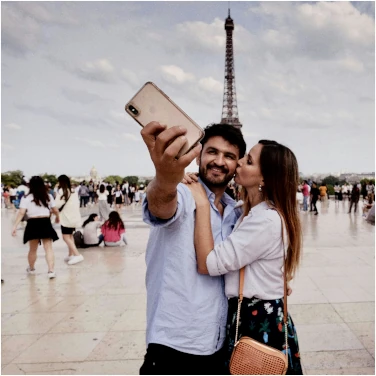
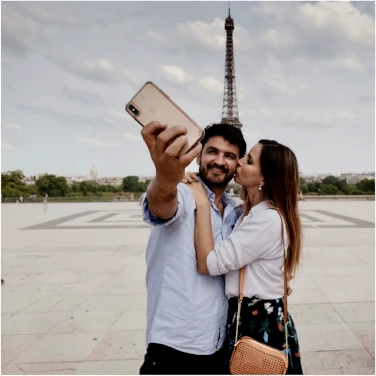
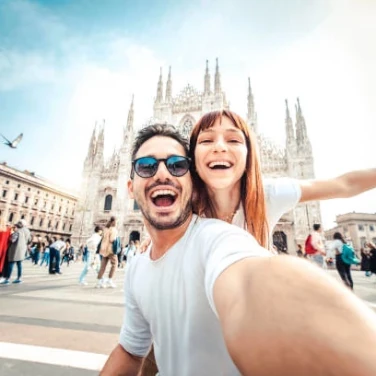
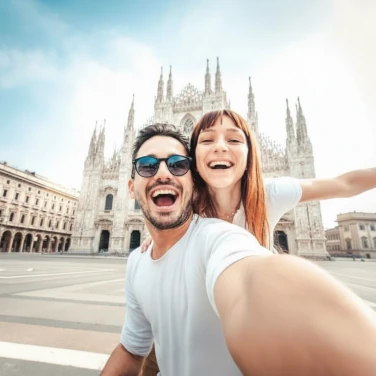
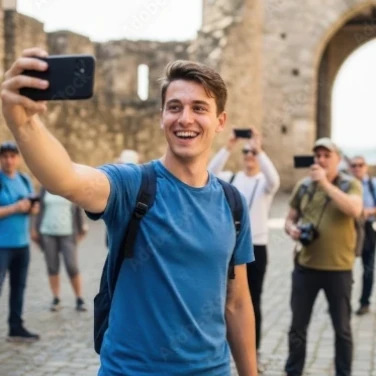
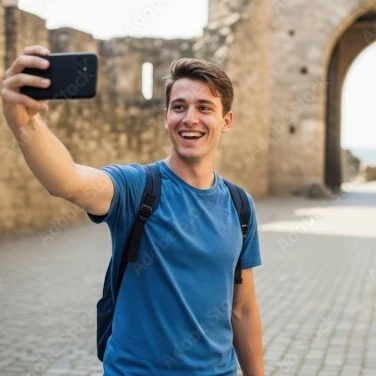
Before & after: real people removed from photos with AI
You may also be interested in
Discover more AI tools created by our team.
Why SoloShot makes clean photos effortless
AI-powered people detection and removal
Our AI is trained to precisely detect and remove background people, tourists, and photobombers while keeping you and your surroundings perfectly intact.
Blazing fast
Get a spotless, ready-to-post image in under 30 seconds.
Save your best moments
Perfect for travel photos, beach shots, and event pictures. Get Instagram-ready results without any editing skills or expensive software.
Frequently Asked Questions
What happens to the area where people are removed?
The AI intelligently reconstructs the background to look natural, as if the person was never there. It matches textures, lighting, and perspective seamlessly.
What type of photos work best for people removal?
Photos where you’re clearly in the foreground work best. The AI identifies all background people — tourists, strangers, photobombers — and removes them while naturally reconstructing the scene behind them.
How many people can I remove from my photos?
With your $0.99 payment, you get 3 clean-ups. Try multiple photos and pick your favorite.
Does it change my appearance?
No. The AI only removes background people and reconstructs the background to look natural. You remain unchanged.
Can I download the image in high quality?
Yes, once payment is made, your clean photo is available in high-resolution for instant download and sharing.
